API Keys
Richfolio uses up to 5 external services, all with generous free tiers. Only Resend and a recipient email are required — everything else is optional.
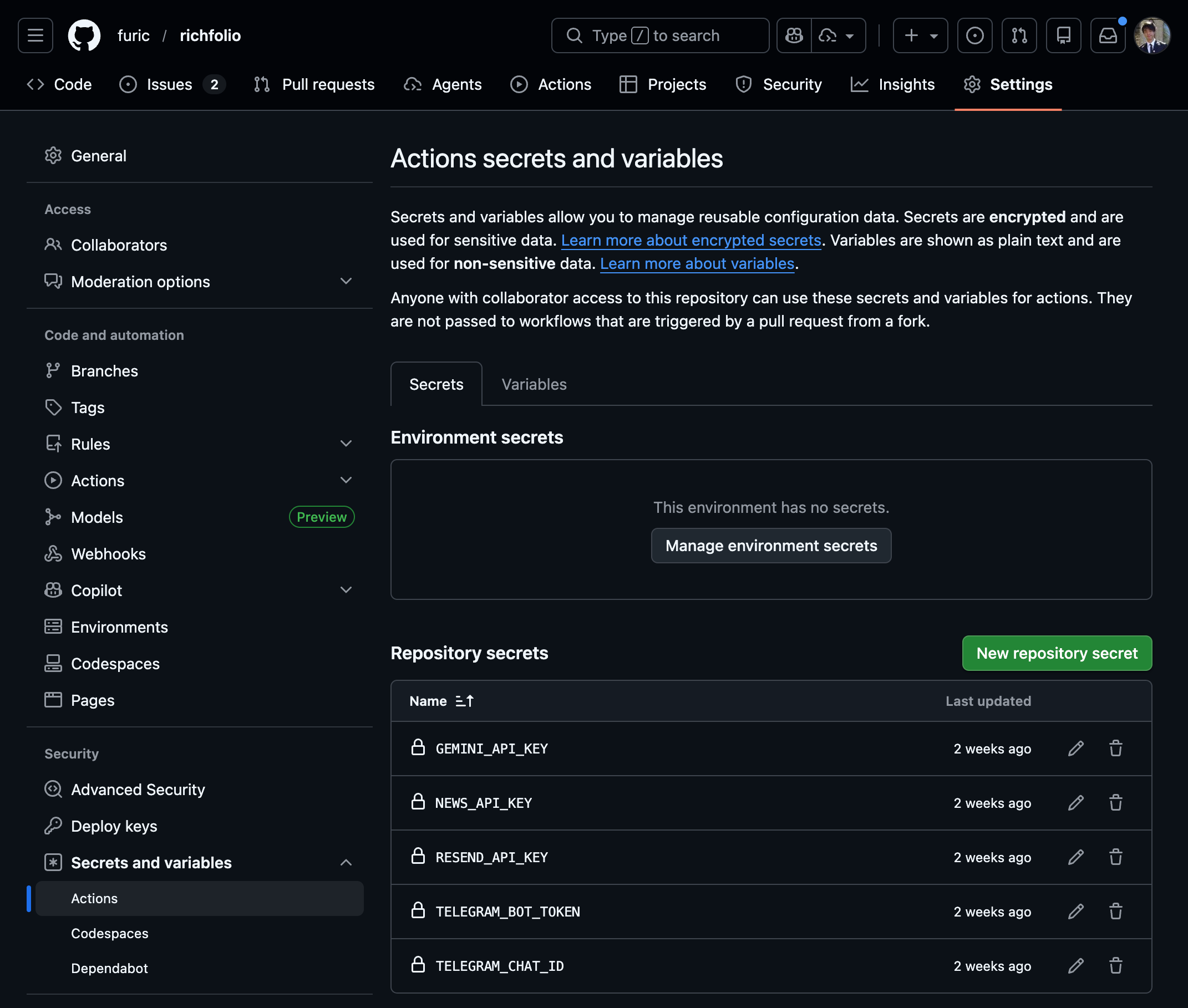
Add each key as a repository Secret: Settings → Secrets and variables → Actions → Secrets tab. Add RECIPIENT_EMAIL as a Variable instead (easier to view/edit).
Resend (Email) — Required
Resend delivers the HTML email reports.
- Go to resend.com and sign up
- Navigate to API Keys in the dashboard
- Click Create API Key, give it a name, and copy the key
- Add as a GitHub Secret — name:
RESEND_API_KEY, value: the key you just copied
Free tier: 3,000 emails/month. Sends from onboarding@resend.dev by default. Can only send to your account owner email unless you verify a custom domain (Dashboard → Domains → Add Domain → add DNS records).
Recipient Email — Required
Add as a GitHub Variable (not Secret): name: RECIPIENT_EMAIL, value: your email address.
Must match your Resend account email unless you’ve verified a custom domain.
NewsAPI (Headlines) — Optional
Provides top headlines per ticker for the daily brief.
- Go to newsapi.org and sign up
- Your API key is shown on the dashboard immediately
- Add as a GitHub Secret — name:
NEWS_API_KEY, value: the key from the dashboard
Free tier: 100 requests/day. Richfolio uses ~4 requests per run via batching. Headlines from the last 24 hours only. If not set, the brief runs without news.
AI Providers — at least one required for AI recommendations
Richfolio supports three AI providers: Google Gemini, Anthropic Claude and Mistral. Set at least one for AI-powered recommendations. Set two or more to run them in parallel — scores are then averaged and a per-AI breakdown is shown next to every recommendation. If none is set, Richfolio falls back to gap-based recommendations (no AI).
| Mode | Setup | Output |
|---|---|---|
| No AI | No key set | Gap-based recommendations only |
| Single AI | One key set | Identical to today — one set of action + confidence per ticker |
| Multi-AI | Two or more keys set | Per-ticker consensus action + averaged confidence; per-AI breakdown shown beneath each rec; STRONG BUY capped by dissent distance |
Google Gemini — Optional
Powers the AI buy recommendations with Gemini 2.5 Flash.
- Go to aistudio.google.com/apikey
- Click Create API Key, select a Google Cloud project (or create one)
- Copy the key and add as a GitHub Secret — name:
GEMINI_API_KEY, value: the key you just copied
Free tier: As of August 2026, a live 429 for gemini-2.5-flash reported a quota of ~20 requests/day (previously documented here as 250/day — Google changes these limits without notice, so treat aistudio.google.com/rate-limit as the canonical source). Richfolio uses 2 requests per run (Stage 1 Observe + Stage 2 Decide), plus 1 per STRONG BUY ticker for detailed analysis, plus 1 for the daily news relevance filter. Across the full 6-run daily schedule (1 daily + 5 intraday) that’s 13+ requests on a quiet day, so Gemini will often exhaust its quota and drop out of later runs — the brief still sends, with a ⚠ n/n AI badge marking the degraded provider. New keys may take a few minutes for quota to activate (you might see 429 errors initially).
Newly created keys cannot use gemini-2.5-flash. Google retires models for new API keys before old ones — a key created in August 2026 returns 404 ... no longer available to new users while an established key on the same model keeps working. Set the GEMINI_MODEL env var (default gemini-2.5-flash, left unchanged so existing keys are unaffected) to a current model such as gemini-flash-latest, an alias that tracks the newest Flash. The crypto workflow already does this.
A second key for the crypto schedule: if you use watchingCrypto, create a separate Gemini key and add it as GEMINI_API_KEY_CRYPTO. The crypto workflow runs 8×/day at 2 requests per run — 16/day on its own — so sharing one key with the equity schedule would exhaust both before mid-afternoon. The workflow maps it onto GEMINI_API_KEY at the step level, so no code knows the difference. It also pins AI_DETAILED_PROVIDER=mistral so the per-STRONG-BUY detailed call doesn’t eat the remaining headroom. If Gemini still exhausts routinely, widen the cron in crypto-monitor.yml from 0 */3 * * * to 0 */4 * * * (6 runs = 12 requests).
A note on Gemini model tiers
Google’s pricing page states that Gemini 2.5 Pro is “Free of charge” for both input and output tokens. In practice, however, free-tier Pro requests frequently hit 429 RESOURCE_EXHAUSTED errors — even with minimal usage. Google does not publish the actual RPD (requests per day) limits for the free tier; third-party sources suggest Pro may be capped at ~100 RPD, but the real number appears to vary by account and is not guaranteed.
Richfolio uses Gemini 2.5 Flash by default because Flash has a more generous and reliable free-tier quota. The quality difference for financial analysis text is negligible.
Anthropic Claude — Optional
Powers the AI buy recommendations with Claude (Sonnet 5.5 by default). There are two ways to authenticate, and Richfolio picks whichever you configure.
Option 1 — Claude Pro/Max subscription (no per-token cost)
If you already pay for Claude Pro or Max, Richfolio can run on your existing subscription allocation instead of buying API credits.
- Install Claude Code and sign in with the account holding your subscription
- Run
claude setup-tokenlocally and copy the token it prints - Add as a GitHub Secret — name:
CLAUDE_CODE_OAUTH_TOKEN, value: the token
Leave ANTHROPIC_API_KEY unset when you use this. Inside Claude Code an API key outranks the subscription token, so setting both would quietly bill your API account — exactly what this option exists to avoid. Richfolio prefers the subscription token and strips the API key from the subprocess, but the cleanest setup is to have only one.
Validity: roughly one year, with no auto-refresh. Unlike the Threads token there is no refresh workflow — re-run claude setup-token annually. When it expires Claude drops out of the run. In a multi-provider setup (Claude plus Gemini and/or Mistral), the surviving provider(s) continue and the brief is marked ⚠ n/n AI rather than failing — but that badge only fires when 2+ providers are configured. If Claude is your only provider, there’s no survivor to promote a badge for: the brief silently falls back to gap-based recommendations instead.
Option 2 — API key (pay-per-use)
- Go to console.anthropic.com and sign up
- Navigate to API Keys → Create Key, give it a name, copy the key
- Add as a GitHub Secret — name:
ANTHROPIC_API_KEY, value: the key you just copied
Pricing: Anthropic does not have a permanent free tier like Gemini, but new accounts receive a small starter credit and Sonnet usage for Richfolio’s workload is typically cents per day. To minimise cost, set CLAUDE_MODEL=claude-haiku-5-5 (the Haiku tier is significantly cheaper while still handling this workload well).
Mistral — Optional
Powers the AI buy recommendations. The code default is mistral-large-latest, but the free tier cannot run it — set MISTRAL_MODEL (see below).
- Go to console.mistral.ai and sign up
- Navigate to API Keys → Create new key, copy the key
- Add as a GitHub Secret — name:
MISTRAL_API_KEY, value: the key you just copied
Free tier — you must set MISTRAL_MODEL: the free tier grants only the ministral-* family. mistral-large-latest (the code default) returns 403 tier_not_allowed, and every mistral-small/medium-* and magistral-* model reports x-ratelimit-limit-req-minute: 0 — no allowance at all, not a throttle you can retry past. Leave it unset on a free key and Mistral contributes nothing: the run logs Provider Mistral failed and quietly degrades to the other providers. Set MISTRAL_MODEL=ministral-14b-latest (30 req/min, 256k context, the largest the free tier allows); ministral-8b-latest (188/min) and ministral-3b-latest (750/min) trade quality for headroom. Check what a key actually allows with curl -s -H "Authorization: Bearer $MISTRAL_API_KEY" https://api.mistral.ai/v1/models — and read the limit header, since a model can be listed yet have a 0/min allowance.
Mistral is a good second provider precisely because it is an independent model lineage from Gemini — a second model only adds information when its disagreement reflects the data rather than the model being weaker.
Multi-AI mode
If two or more of GEMINI_API_KEY, Claude (CLAUDE_CODE_OAUTH_TOKEN or ANTHROPIC_API_KEY) and MISTRAL_API_KEY are set, Richfolio runs those providers concurrently on every analysis and aggregates the results:
- Consensus action per ticker via a rank-weighted vote: each model’s vote counts its rank out of 10 — by default Claude Opus 10, Sonnet 8, Gemini Pro 8, Gemini Flash 6, Mistral Large 7, Ministral 14b 4 (
src/providers/modelRank.ts). Override per provider with"ai": { "providerRanks": { "mistral": 2 } }. Ties go to the more conservative action; confidence never breaks them, because providers aren’t calibrated alike - Averaged confidence displayed prominently; per-AI scores shown beneath
- STRONG BUY capped by dissent distance — a STRONG BUY survives while every dissenter is within one rung of it (a dissenting
BUYagrees about direction), and caps at BUY as soon as one is further out (HOLD/WAIT). A weighted STRONG BUY majority stands regardless: Gemini + Opus voting STRONG BUY (16 of 20) outvote a MinistralWAIT, while a lone Ministral STRONG BUY (4) loses to an OpusBUY(10). STRONG BUY never wins a tie - Agreement label (unanimous / majority / split) shown as a badge next to the action
The aggregated action is a summary, not a gate. Every provider’s action, confidence and reasoning renders beneath it, and any ticker a provider called STRONG BUY keeps its detailed-analysis page, its “More Details” link, its limit price and its technicals — capped or not. You see the votes and decide.
To require unanimity instead — any dissent at all demotes STRONG BUY to BUY — set "ai": { "strongBuyRequiresAllProviders": true } in config.json.
If a provider fails mid-run (rate-limited, quota exhausted, network error), the surviving providers continue without it. The run is then marked degraded: every recommendation carries a ⚠ 1/2 AI-style badge in the email (a tag in Telegram), because a lone provider’s vote should not read as a cross-checked one. The action itself is left alone by default — a provider that never answered is not a dissenter at any distance — unless strongBuyRequiresAllProviders is on, which caps a degraded STRONG BUY too. This does not apply when only one provider is configured; that setup never promised a comparison.
Choosing which provider generates the detailed STRONG BUY analysis page
When several providers are active, the per-STRONG-BUY analysis page (the “More Details” link) is generated by a single provider — by default the first available one in registry order (Gemini, then Claude, then Mistral). Override with:
| Env var | Value | Effect |
|---|---|---|
AI_DETAILED_PROVIDER | gemini | Force Gemini for detailed analysis (must have GEMINI_API_KEY set) |
AI_DETAILED_PROVIDER | claude | Force Claude for detailed analysis (must have CLAUDE_CODE_OAUTH_TOKEN or ANTHROPIC_API_KEY set) |
AI_DETAILED_PROVIDER | mistral | Force Mistral for detailed analysis (must have MISTRAL_API_KEY set) |
MISTRAL_MODEL | ministral-14b-latest | Required on the free tier — the default mistral-large-latest is paid-tier only |
CLAUDE_MODEL | e.g. claude-haiku-5-5 | Override Claude model (default: claude-sonnet-5-5) |
An AI_DETAILED_PROVIDER naming a provider whose key is not set (or an unknown name) is logged and ignored, falling back to registry order — pinning a provider with no API key would otherwise fail every ticker.
Telegram Bot — Optional
Delivers condensed summaries to your Telegram account.
Create the bot
- Open Telegram and search for @BotFather
- Send
/newbot - Choose a name (e.g., “Richfolio Brief”) and username (must end in
bot, e.g.,richfolio_brief_bot) - BotFather replies with your bot token — copy it
Get your chat ID
- Search for @userinfobot on Telegram and start it
- It replies with your numeric user ID — this is your chat ID
Important: Send any message to your new bot (e.g., “hi”) before running Richfolio — this is required before the bot can message you.
Add both as GitHub Secrets:
- Name:
TELEGRAM_BOT_TOKEN, value: the token from BotFather - Name:
TELEGRAM_CHAT_ID, value: your numeric user ID
Notes: If not set, the brief skips Telegram. Messages are condensed summaries (not full HTML). 4,096 character limit per message — news is truncated if needed.
Social Posting — Optional
Richfolio can publish generic buy signals to public accounts on X, Facebook, Threads, and LinkedIn. Every platform is optional and stays off until configured. Required secrets per platform:
- Facebook:
FACEBOOK_PAGE_ID,FACEBOOK_PAGE_TOKEN - Threads:
THREADS_USER_ID,THREADS_ACCESS_TOKEN(+ optionalTHREADS_TOKEN_PATto auto-refresh the ~60-day token) - LinkedIn:
LINKEDIN_ACCESS_TOKEN,LINKEDIN_ORG_URN - X/Twitter:
X_API_KEY,X_API_SECRET,X_ACCESS_TOKEN,X_ACCESS_TOKEN_SECRET
Notes: Posts are generic — no holdings or allocations are disclosed. If unset, social posting is skipped. See Social Posting for step-by-step setup of each platform.
Summary
| Key | Required | Service |
|---|---|---|
RESEND_API_KEY | Yes | Email delivery |
RECIPIENT_EMAIL | Yes | Your email address |
NEWS_API_KEY | No | News headlines |
GEMINI_API_KEY | No | AI provider (Google Gemini) |
GEMINI_API_KEY_CRYPTO | No | Second Gemini key, used only by the crypto workflow so its 8×/day cadence has its own quota |
CLAUDE_CODE_OAUTH_TOKEN | No | AI provider (Anthropic Claude via Pro/Max subscription) |
ANTHROPIC_API_KEY | No | AI provider (Anthropic Claude via pay-per-use API key) |
MISTRAL_API_KEY | No | AI provider (Mistral — free Experiment tier) |
TELEGRAM_BOT_TOKEN | No | Telegram delivery |
TELEGRAM_CHAT_ID | No | Telegram delivery |
FACEBOOK_PAGE_ID / FACEBOOK_PAGE_TOKEN | No | Facebook Page posting |
THREADS_USER_ID / THREADS_ACCESS_TOKEN | No | Threads posting |
THREADS_TOKEN_PAT | No | Auto-refresh the Threads token (PAT with Secrets write) |
LINKEDIN_ACCESS_TOKEN / LINKEDIN_ORG_URN | No | LinkedIn Page posting |
X_API_KEY / X_API_SECRET / X_ACCESS_TOKEN / X_ACCESS_TOKEN_SECRET | No | X/Twitter posting |
CLAUDE_MODEL | No | Override Claude model (default: claude-sonnet-5-5) |
MISTRAL_MODEL | No | Override Mistral model (default: mistral-large-latest; free tier must set ministral-14b-latest) |
AI_DETAILED_PROVIDER | No | Force gemini, claude or mistral for the STRONG BUY analysis page |